


ESTIMATE
Priced before the work
Itemized estimates with notes. When the customer says yes, convert it to an invoice in one click — nothing retyped.
APPLIANCE REPAIR SOFTWARE
Same-day calls land on the board, every technician’s day is in order on their iPhone, and the invoice gets paid at the door — for $24.99/mo for the whole team.
FREE PLAN · NO CARD · NO PER-SEAT FEES
A SAMPLE DAY
Illustrative day using the sample workspace.
Two new jobs are waiting under Unassigned: one from the website form, one taken by phone.
The first dryer call is on the technician’s iPhone, with the address and the customer’s problem.
Photos of the worn part and a note go onto the job record.
The customer approves the estimate, and it converts to the invoice in one click.
Paid at the door with Tap to Pay on iPhone.
The office checks what’s paid and what’s still owed.
Website lead intake and Tap to Pay on iPhone are set up with you.

DISPATCH BOARD
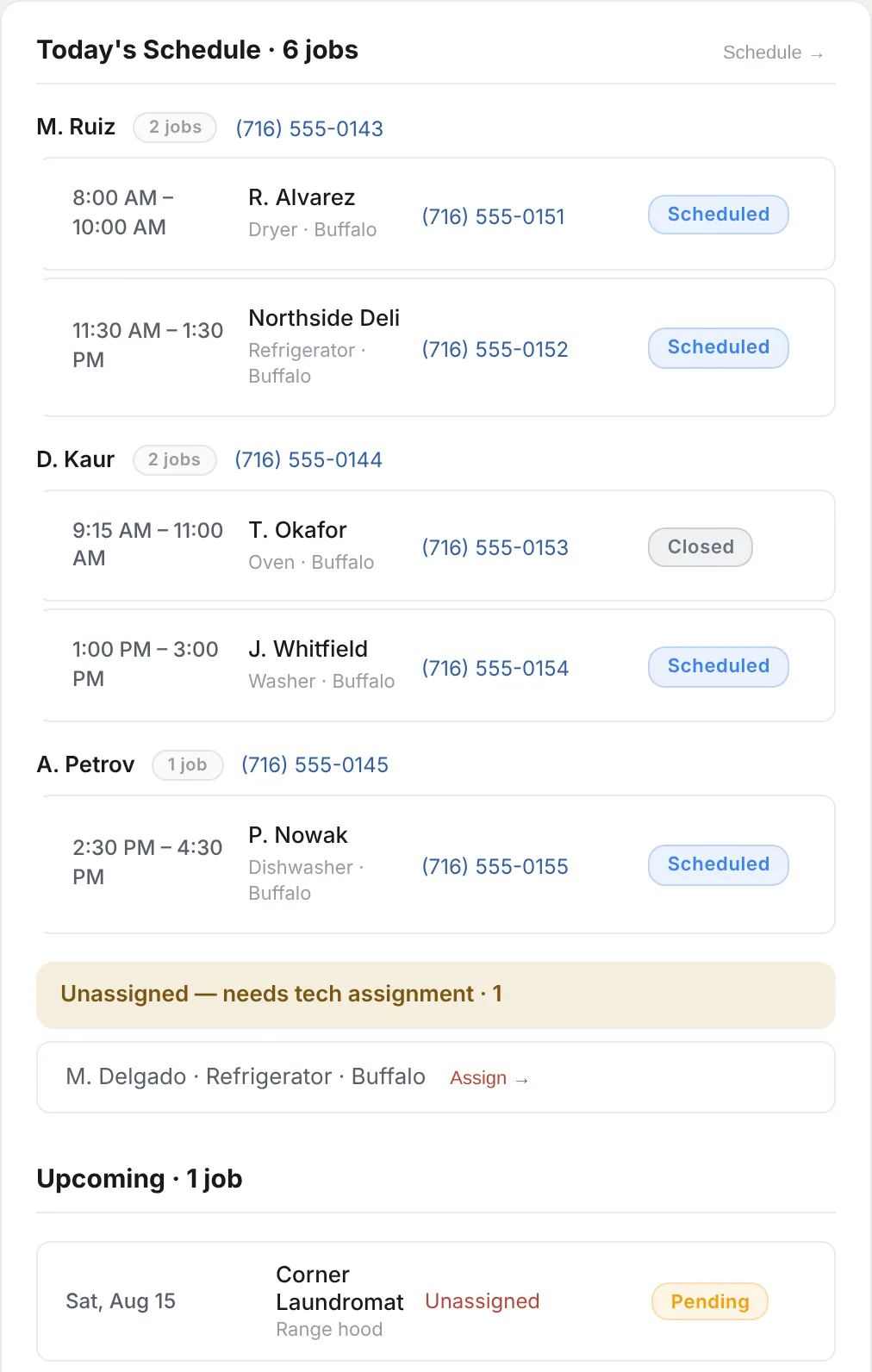
Every technician’s jobs, every job’s status and every call still waiting — before the first job of the day.


Each tech’s jobs for the day in time order, with the customer, the job, the phone number and the status.
New jobs wait under “Unassigned — needs tech assignment” until someone assigns them to a technician.
Pending, scheduled and closed — every job’s status sits on the board, next to the follow-ups due and the jobs that need attention.
The real Dispatch screen of the S Protocol web app, with a sample workspace. Technicians work the same jobs from S Protocol for iPhone.

THE TECHNICIAN APP
S Protocol for iPhone gives each technician their day in order, a place for notes and photos, the customer’s signature and a way to take payment at the door — on the same job record the office sees.
Before-and-after photos and notes go on the job record the office sees.
The customer signs on the technician’s iPhone, and the signature stays on the job.
Take the card with Tap to Pay on iPhone or a card reader (USD), or record a cash payment.

S Protocol runs on iPhone and on the web. There’s no Android app.
ESTIMATES · INVOICES · PAYMENTS
Price the work with an estimate. When the customer approves it, it converts to the invoice in one click. They pay online from the invoice link — or your technician takes the card at the door.
ESTIMATE
Itemized estimates with notes. When the customer says yes, convert it to an invoice in one click — nothing retyped.
INVOICE
Send a link or a PDF. Your customer opens it, sees the work and pays by card.
Online card payments run on Stripe, connected with you during setup.
IN PERSON · USD
Tap to Pay on iPhone and card readers
PAYMENT
Take the payment on the iPhone already in the technician’s hand — no card reader to buy, carry or charge. Card readers work too. In-person payments are in USD.
WHERE THIS CAME FROM
Every workflow here started as a problem somebody had on a Tuesday morning: a technician stuck without the history, an invoice nobody chased, a job assigned twice. That’s why the dispatch board looks the way it does — and why S Invoice exists separately for people who only need the paperwork.
FAQ
No. S Protocol Pro has no team-member limit and no per-seat charge. Add the dispatchers and technicians the business actually employs.
Yes — with Tap to Pay on iPhone or a card reader (USD), or by recording a cash payment.
No. S Protocol runs on the web and on iPhone.

FREE TO START · NO CARD
Free for your first 5 jobs, 5 invoices and 5 payments. No card.