


ESTIMATE
Priced before the work
Itemized estimates with notes. When the customer says yes, convert it to an invoice in one click — nothing retyped.
S PROTOCOL · FIELD SERVICE SOFTWARE
S Protocol was built inside a working appliance repair business: one dispatch board for the whole office, S Protocol for iPhone in every technician’s pocket, estimates, invoices and payments — for $24.99/mo for the whole team, with no per-seat fees.
FREE PLAN · NO CARD · PRO $24.99/MO · NO PER-SEAT FEES


DISPATCH & SCHEDULING
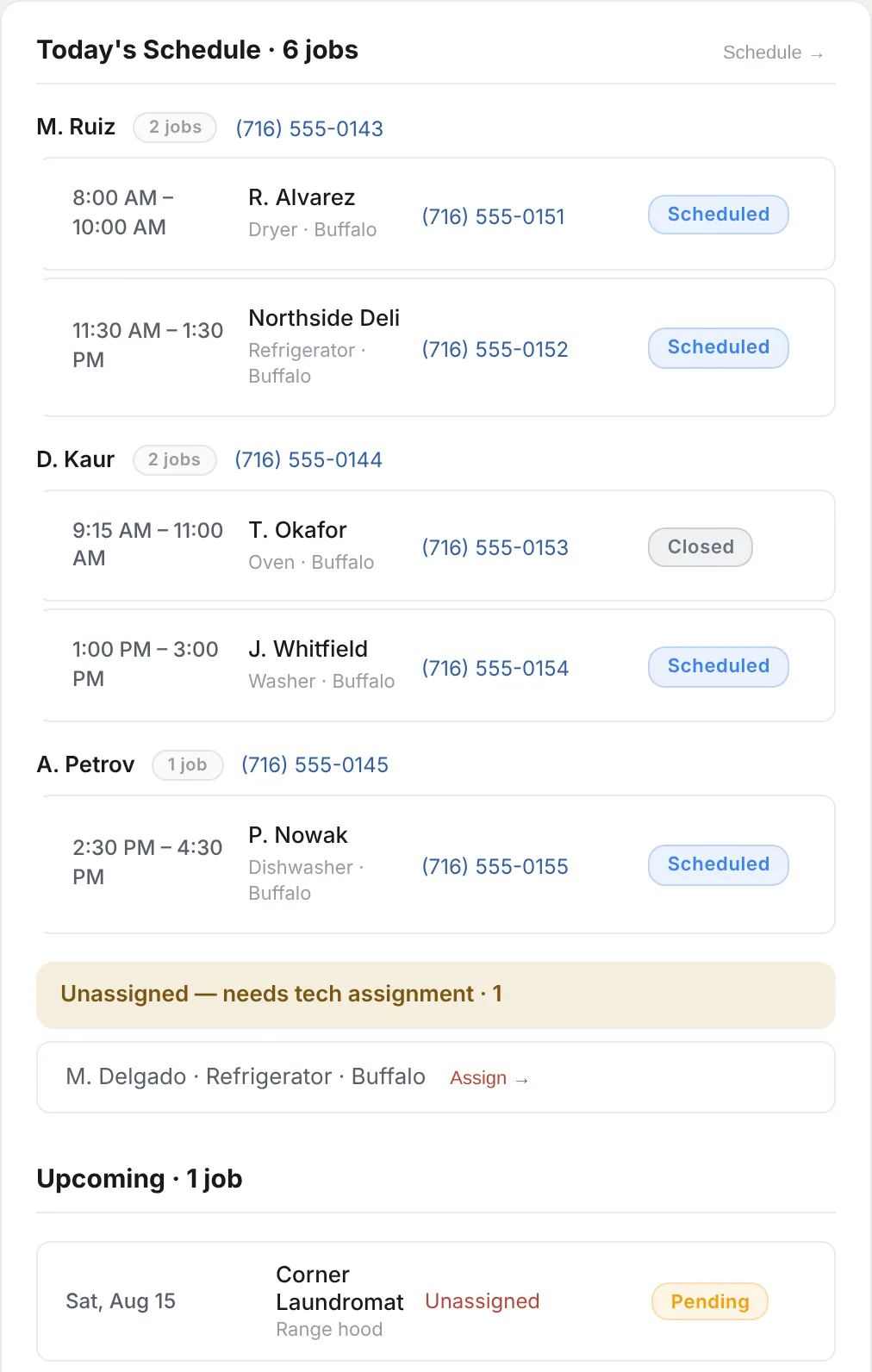
Who’s working, what’s booked, what needs attention and what’s still unassigned — on one screen the whole office shares.
01
Each technician’s jobs for the day in time order, with the customer, the job, the phone number and the status.
02
New jobs wait under “Unassigned — needs tech assignment” until someone assigns them to a technician.
03
Pick the slot, pick the technician — the schedule and the board update together.
Real screens of the S Protocol web app, with a sample workspace.
S PROTOCOL FOR iPhone
Their day in order, notes and photos, the customer’s signature and payment at the door — on the same record the office sees.
Before-and-after photos and notes go on the job record the office sees.
The customer signs on the technician’s iPhone, and the signature stays on the job.
Take the card with Tap to Pay on iPhone or a card reader (USD), or record a cash payment.

S Protocol runs on iPhone and on the web. There’s no Android app.
CUSTOMERS
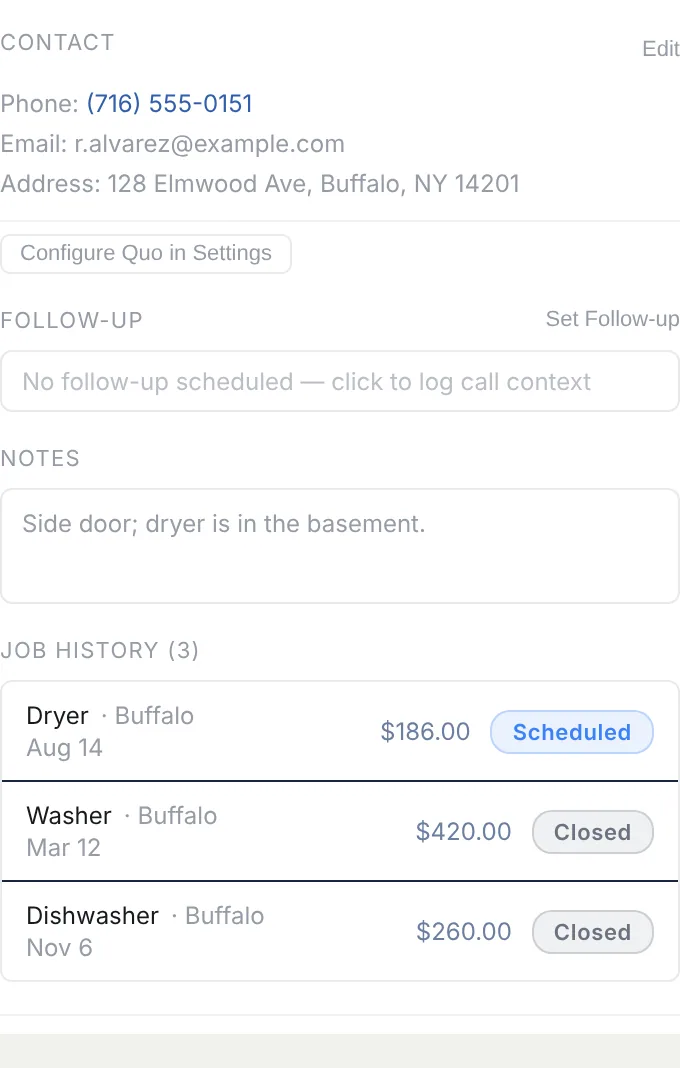
Every client record keeps the contact details, notes and the full job history — so the next visit starts from what you already know.
Client records
Full job history
Notes and photos
Website lead intake (set up with you)
Website leads arrive with the address and the problem attached, ready to become a booked job.
Calls and SMS through Quo (by request)
On your business line.
ESTIMATES · INVOICES · PAYMENTS
Price the work with an estimate. When the customer approves it, it converts to the invoice in one click. They pay online from the invoice link — or your technician takes the card at the door.
ESTIMATE
Itemized estimates with notes. When the customer says yes, convert it to an invoice in one click — nothing retyped.
INVOICE
Send a link or a PDF. Your customer opens it, sees the work and pays by card.
Online card payments run on Stripe, connected with you during setup.
IN PERSON · USD
Tap to Pay on iPhone and card readers
PAYMENT
Take the payment on the iPhone already in the technician’s hand — no card reader to buy, carry or charge. Card readers work too. In-person payments are in USD.
Analytics and reporting
REPORTS
Analytics and reporting on jobs, invoices and payments.
| Feature | S Invoice | S Protocol |
|---|---|---|
| Estimates and invoices | Included | Included |
| Payment links and PDFs | Included | Included |
| Online card payments (Stripe, set up with you) | Included | Included |
| Tap to Pay on iPhone and card readers | Not included | Included, USD |
| Document currencies | USD, CAD, EUR, GBP | USD |
| Customer statements | On iPhone | Not included |
TEAM & ROLES
Owner, dispatcher and technician roles, team chat on the job and technician earnings — with no per-seat fees and no team-member limit.

Every role is included in Pro — with no per-seat fees and no team-member limit.
Talk about the job on the job, not in a separate group chat.
Keep your standard services and prices in one place.
The numbers come from the same jobs, invoices and payments your team works on.
INTEGRATIONS
Available with setup — live, we provision it with you · By request — built case by case, talk to us.
PRICING
Add every dispatcher and technician you employ — the price doesn’t move. Free is a real way to set up and try the whole platform.
S PROTOCOL FREE
$0No card required
S PROTOCOL PRO
$24.99/month
or $249.99/year — $20.83/mo, save $49.89
$249.99/year
$20.83/mo billed yearly — $49.89 less than monthly
Start on Free, then upgrade when you’re ready.
1 Integrations are set up with you or available by request — see Integrations.
Prices in USD. Subscriptions renew until canceled. If you subscribe through the App Store, Apple handles the billing and you manage the subscription in your Apple account. By subscribing you agree to the Terms of Service and Privacy Policy, which cover S Protocol and S Invoice alike.
FAQ
No. S Protocol Pro has no team-member limit and no per-seat charge. Add the dispatchers and technicians the business actually employs.
No. There’s a Free plan with a real allowance instead, and it uses the same product Pro does — not a stripped-down demo. We’d rather you test the real thing than race a countdown.
You can’t create new records of that kind until you upgrade. Nothing is hidden, locked or deleted — every job, invoice, payment and customer you already have stays fully readable. The allowance is one-time per business, not monthly, and deleting a document doesn’t give it back.
S Protocol runs on the web and on iPhone. There’s no Android app, and we won’t claim one until there is.
Stripe, Tap to Pay on iPhone and card readers, and website lead intake are live — we set them up with you. Quo, Thumbtack and API access are built case by case, so talk to us first.
S Protocol works in USD, and in-person card payments are USD.
Yes, and it isn’t a migration. S Protocol is activated on the same workspace, so your customers, invoices, estimates, company details and invoice numbering are simply still there. The owner starts it from Settings, and that first activation is on a paid S Protocol plan. A free S Protocol account is instead a separate signup with an empty workspace.

FREE TO START · NO CARD
Free for your first 5 jobs, 5 invoices and 5 payments. No card.